
Checking one page's SEO usually means opening a tool, pasting the URL, waiting for a crawl… just to answer "is this page okay?". We got tired of that, so we put the audit where you already are: the browser.
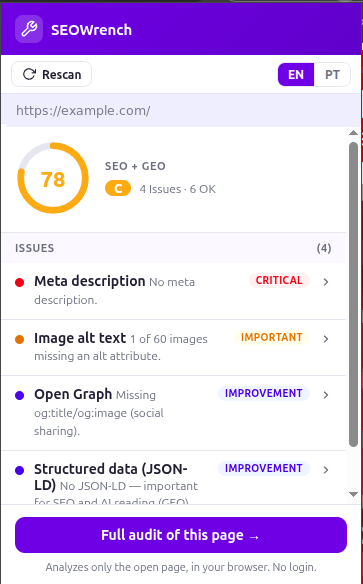
The SEOWrench Chrome extension is free. Click the icon and it scores the page you're on — instantly, no login, in English or Portuguese.
If you'd rather not install anything, the free check audits one page on the website, with no sign-up.
What it checks
One click gives you a score for the on-page signals that actually decide visibility:
- On-page SEO:
<title>, meta description, a single clear<h1>, canonical,noindex, viewport,html lang, and imagealttext. - GEO / AI-readiness: Open Graph tags and structured data (JSON-LD) — the metadata that lets ChatGPT, Perplexity and Gemini understand and cite the page. (New to this? See what GEO is.)
It rolls that into a single SEO + GEO score with each issue ranked by severity, so you know what to fix first — not a wall of 300 metrics.
It highlights the problems on the page
Beyond the score, the extension can highlight the flagged elements right on the page —
so you see exactly which image is missing alt, or that the <h1> isn't where you
thought. Findings become obvious instead of abstract.
Private by design
The extension analyzes the page entirely inside your browser, and only when you click its icon. It reads the on-page elements locally — nothing about the pages you visit is sent to a server. No account required to run it.
From quick check to full audit
The extension is the fast, single-page view. When you want the whole picture — crawling every page, history, exports and the full per-engine GEO breakdown — the web app picks up where the extension leaves off. One click in the popup takes you straight into a full audit of that page.
Curious how bad (or good) the web really is at this? We scored 32 of the biggest sites: are the top sites ready for AI?
Install it (free)
Open any page, click the icon, get your SEO + GEO score. Then tell us what you'd like it to check next.